Portugal Jersey Mismatch: Lock Variant Before Paying
| Published | |
|---|---|
| Revised | |
| Editors | Maya Chen Editor-in-Chief |
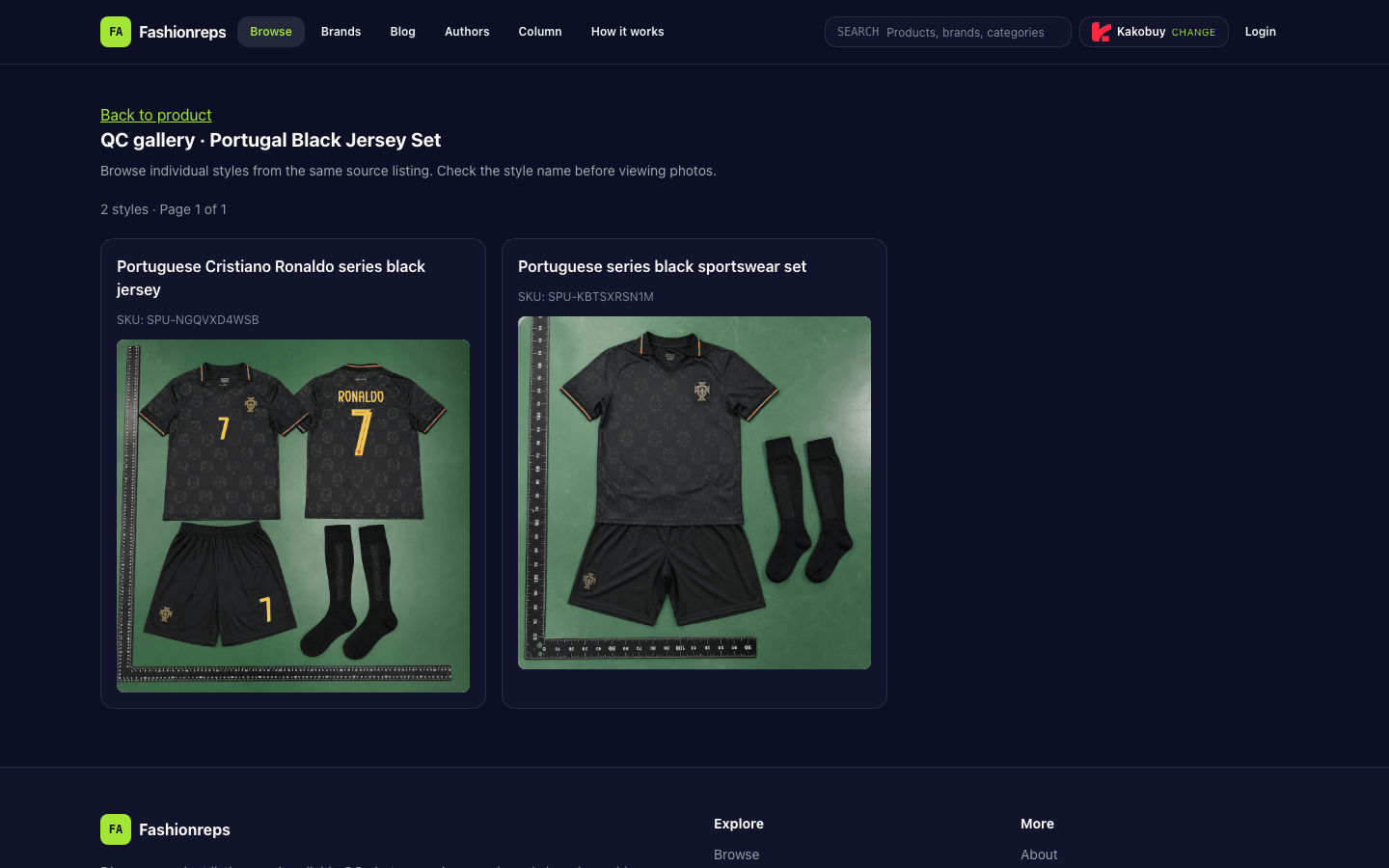
First Determine the Issue: The Page Has Two Variants, Don't Just Look at the Overall Title If the portugal jersey product page and the cart show different variants, don't judge by the product main image or overall title before payment. Verified Fashionreps product data shows that this source page has 2 variants: Portuguese Cristiano Ronaldo series black jersey, SKU SPU-NGQVXD4WSB; Portuguese series black sportswear set,
Editor score 4.2 / 5
First Determine the Issue: The Page Has Two Variants, Don't Just Look at the Overall Title
If the portugal jersey product page and the cart show different variants, don't judge by the product main image or overall title before payment. Verified Fashionreps product data shows that this source page has 2 variants: Portuguese Cristiano Ronaldo series black jersey, SKU SPU-NGQVXD4WSB; Portuguese series black sportswear set, SKU SPU-KBTSXRSN1M. Both are black Portugal series items, but the variant names and product identifiers are different.
Therefore, when different text appears in the cart, first confirm whether it is a simplified option name, a different display field on the page, or actually adding another SKU. The current data only proves that the page has these two variants, and cannot conclude that the target site has a system failure, nor prove that a certain variant is still available for purchase.

Image: Product variant field verification process diagram, not evidence of actual product, QC, or personal testing.
Step 1: Save Original Evidence Before Payment
Before reselecting or refreshing the page, record the following:
- The original product page URL.
- The product title and page access time.
- The variant name shown on the product page.
- Text and images of team crest, patterns, or player-related fields.
- Color, size, and number options.
- SKU or other product identifier shown on the page.
- Screenshots of the main image and option area before adding to cart.
The key is to save "product identity" and "your selected variant" separately. The overall title only tells the theme of the product page, and cannot replace variant fields such as variant name, SKU, size, etc.
Step 2: Compare Product Page Options One by One
On the product page, reselect the target variant and check in the following order:
- First confirm the variant name, whether you want a single black jersey or a black sportswear set.
- Then confirm whether the images of team crest, patterns, and player-related elements match the target variant.
- Record color and size, don't confuse color fields with variant fields.
- If the page provides number or personalization options, record its current value; if no such field is seen, don't infer personalization support.
- Find the SKU or variant ID, and save it corresponding to the variant name on the page.
In the verified data, the two variants have different SKUs. If the product page shows only one SKU and the cart shows another, treat it as an unresolved identity difference before payment, not a simple abbreviation.
Step 3: Check the Actual Record After Adding to Cart
After adding the target options to the cart, don't just look at the overall product title in the cart. Check item by item:
- Is the variant name in the cart still consistent with the product page?
- Does the cart image correspond to the image selected on the product page?
- Does the cart show the same SKU or variant ID?
- Are color, size, and number options consistent?
- After quantity change or reselection, are variant fields reset?
If the cart only shows "Portugal" or similar general text, without variant name, SKU, or checkable image, you cannot prove that the target variant is actually added. In this case, delete the unconfirmed cart item, return to the product page, reselect and record again, to avoid continuing payment without knowing the identity.
Step 4: Check Order Summary and Final Checkout Page
If the cart information looks consistent, continue to check the order summary and final checkout page. On each new page, check whether variant name, image, SKU, color, size, and number fields change.
It is recommended to record the check results as "page name, displayed content, consistent or not, screenshot time". If any key identity field changes unexplainably, pause payment, and do not replace variant confirmation with price, stock prompts, or page loading results.
The current verified data does not provide actual cart, order summary, or final checkout page screenshots, so it cannot confirm which variant will be received after payment, nor determine whether a field is just a frontend display difference.
What to Submit to Official Support If Still Mismatched
If the product page and cart cannot correspond, submit a complete set of materials to the official support channel of Fashionreps or the actual ordering platform:
- Original product URL.
- Product title and page access time.
- Full name of the selected variant on the product page.
- SKU or variant ID shown on the product page.
- Screenshot of the product page option area.
- Screenshot of product name, image, and options after adding to cart.
- Order summary or checkout page screenshot; if not yet paid, clearly state unpaid.
- Repeatable operation steps, such as which variant selected, which add to cart button clicked, and what different content appears in the cart.
When asking, directly request confirmation of the actual SKU and variant name in the cart, not just "Is this a Portugal jersey?" This makes it easier to get a verifiable answer.
Stop Payment Until These Conditions Are Met
If any of the following occurs, pause payment:
- Variant names on product page and cart differ, and cannot be explained.
- SKUs shown in both places differ, and support has not confirmed one is a display alias.
- Cart image does not correspond to the image selected on the product page.
- Color, size, or number options are reset after adding to cart.
- Page only shows general title, insufficient fields to confirm actual variant.
- Order summary is inconsistent with cart record.
- Only guesswork can determine whether the target is a single jersey or a sportswear set.
Until this information is confirmed, the safest conclusion is not "the page must be wrong", but "the actual variant has not been proven". Keep screenshots, links, SKUs, and reproduction steps, then have official support confirm the corresponding variant in the order to reduce the risk of receiving the wrong variant after payment.