Xvessel Accessories: Mark Spec Gaps and Duplicate Links
| Published | |
|---|---|
| Revised | |
| Editors | Maya Chen Editor-in-Chief |
When organizing Xvessel candidates, the most confusing part isn't the number of items, but the relationship between the same page, different specs, and duplicate links. A safer approach is to first use the fashion-reps brand catalog as page evidence, then use Google Sheets to save the spec status and next actions for each record. This helps distinguish between "information already seen," "content that still needs verification," and "records that may just
Editor score 4.2 / 5
When organizing Xvessel candidates, the most confusing part isn't the number of items, but the relationship between the same page, different specs, and duplicate links. A safer approach is to first use the fashion-reps brand catalog as page evidence, then use Google Sheets to save the spec status and next actions for each record. This helps distinguish between "information already seen," "content that still needs verification," and "records that may just be duplicate links."

First, record what the catalog page actually shows
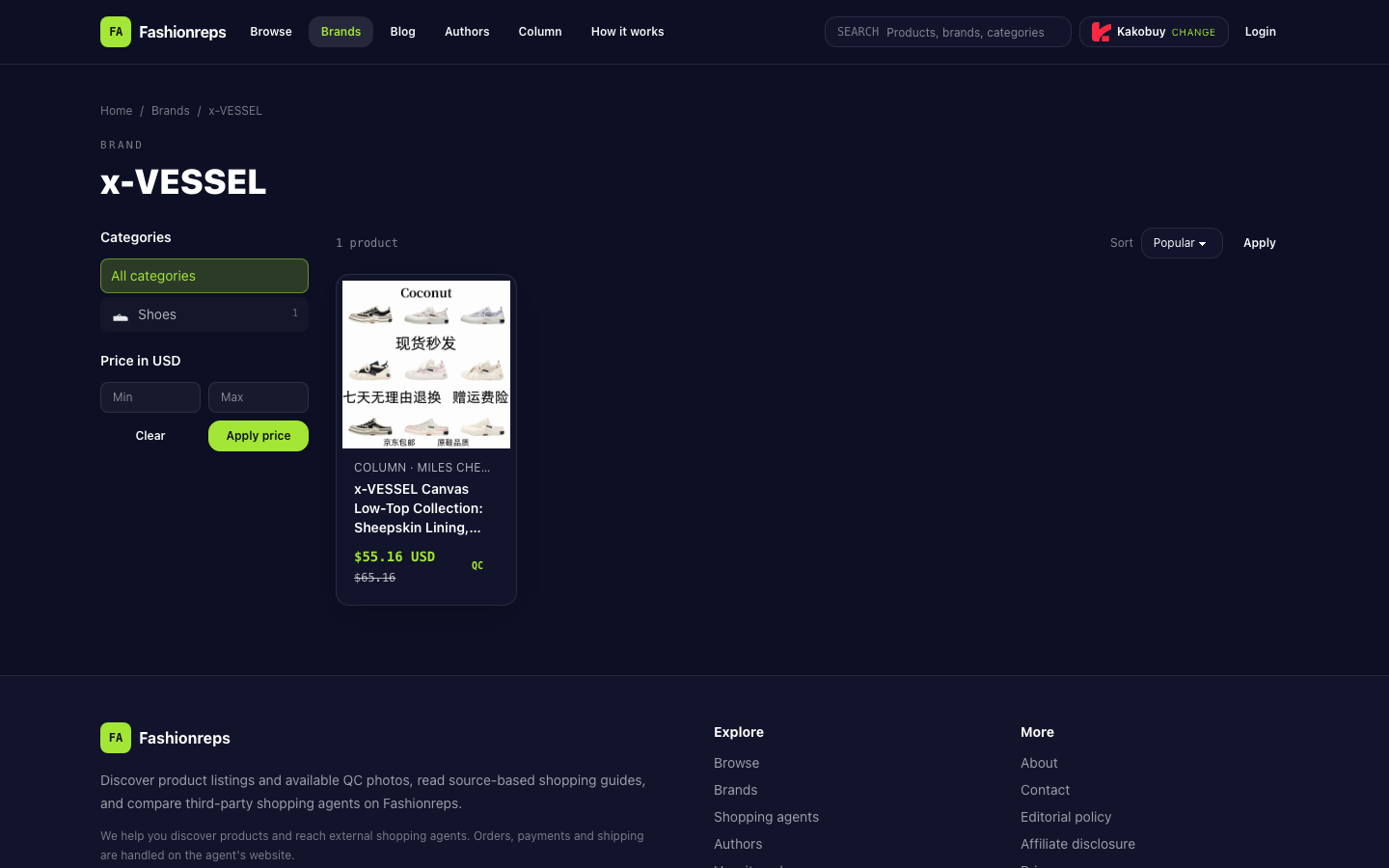
When checking Xvessel pages, don't treat your own category assumptions as page facts. The currently verifiable catalog page shows that the brand filter results include the Shoes category and display 1 item. The product title on the page is "x‑VESSEL Canvas Low-Top Collection: Sheepskin Lining, Faux-Fur Insole and a 4.5 cm Platform Sole." This information can serve as the initial record, but you cannot infer the brand catalog's total item count, inventory, shipping, or functional advantages from it.
The page also shows a reference price of $55.16, with a previous reference price of $65.16. Record this as the price evidence visible on the page at that time, not as the real-time selling price or a purchase recommendation. If the price, title, or item status changes after reopening the page, the new page record should take precedence.
For the first entry, save the following:
- Item category: fill in according to the visible page classification, such as Shoes.
- Page title: keep it complete; do not shorten it to a potentially meaning-changing abbreviation.
- Color or specs: if the page does not clearly show them, fill in "no clear evidence seen"; do not fill in on your own.
- Original link: keep the actual link opened.
- Evidence screenshot: record the screenshot file name or storage location and note the screenshot date.
- Page time: record the date and time when the page was viewed.
- Page status: distinguish among confirmed, pending verification, duplicate candidate, and excluded.
Use fields to separate "same item" and "same link"
Duplicate judgment cannot rely solely on product titles. Two links may have the same title but correspond to different specs, or different links may ultimately point to the same page. Conversely, the same link may show a new title or spec information after a page update, so the link itself can only serve as a clue and cannot alone prove item identity.
In Google Sheets, create one row per page record and use the following fields:
| Field | Recording method | Judgment purpose |
|---|---|---|
| Original link | Paste the actual page link | Determine if links are exactly the same |
| Page title | Copy the visible page title | Compare page names for consistency |
| Visible specs | Fill in only the colors, sizes, or styles clearly shown on the page | Identify spec differences under the same name |
| Evidence screenshot | Write the screenshot name or path | Trace the basis for judgment |
| Page time | Record the viewing time | Distinguish page states at different times |
| Status | Confirmed, pending verification, duplicate candidate, or excluded | Decide the next action |
| Next step | Reopen, add screenshot, merge, or pause | Prevent records from stopping at vague conclusions |
If two records have exactly the same original link, mark them as a "duplicate candidate" first, then check the page title and visible specs. If the links are different, do not merge solely based on identical titles; reopen both pages to confirm whether they point to the same style, same spec, and same page content.
How to mark spec gaps
"Spec gap" refers to missing page evidence that affects identification, not that the item definitely does not exist. For example, the page title mentions canvas shoes, sheepskin lining, faux-fur insole, and a 4.5 cm platform sole, but if the page does not clearly show colors or sizes, leave those fields blank and mark them as pending verification.
Check in the following order:
- Reopen the original link to confirm whether the corresponding page is still accessible.
- Compare the title, images, and visible specs to confirm they belong to the same item record.
- Copy only the color, size, or style information that clearly appears on the page.
- For missing fields, write "no clear evidence seen"; do not guess colors from images, and do not fill in sizes based on common item specs.
- Save a new screenshot and page time, then decide whether to change the status to confirmed.
If the page cannot be opened, the item status is unclear, or spec information contradicts itself in different places, keep the status as pending verification. Pausing purchase decisions when evidence is insufficient is safer than writing uncertain information as confirmed specs.
Deduplication process when repeatedly viewing on mobile
When viewing the catalog on mobile, copying links, going back, and switching records are prone to errors. Use an "add first, merge later" approach; do not delete a row directly without first checking the page.
First, when you see a candidate page, add a new row and fill in the original link, title, page time, and screenshot information. Second, use the sheet filter to find exactly the same original link. Third, check the visible specs of duplicate links one by one; if the specs and evidence are exactly the same, mark one row as a duplicate candidate and note the main record to keep in the next step field. Fourth, for records with different links but the same title, reopen the pages to confirm; do not merge based on title alone. Fifth, only after the evidence correspondence is clear, move the duplicate candidate to excluded status or add a merge note.
Google Sheets is suitable for saving this continuously changing verification process: the catalog page provides the original browsing evidence, and the sheet helps with filtering, sorting, status updates, and collaborative records. It cannot replace reopening the product page, nor can it automatically prove that two links correspond to the same spec.
An actionable status determination standard
Confirmed means the original link is still accessible, and the page title and the visible specs that need to be recorded have corresponding evidence. Pending verification means the link or page is still visible, but the color, size, style, or page correspondence has not been confirmed. Duplicate candidate means a same link was found, or multiple records are highly similar and need further checking. Excluded means after checking, it is determined that the record should not be kept, or the page no longer supports the current record.
Whenever changing a status, write the reason in the notes, such as "title same but color not verified," "link same, screenshot and page time consistent," or "page cannot be reopened, paused judgment." Such notes make it easier for other collaborators to understand why the record changed than using color coding alone.
Pre-finalization checklist
- Reopen pages that are still in confirmed or pending verification status.
- Check whether the page title and screenshot belong to the same record.
- Check whether colors, sizes, and styles all have page evidence.
- Filter for exactly the same original links and process duplicate candidates one by one.
- Do not merge different links just because titles are similar.
- Keep pending verification or paused status for records that cannot be opened, have contradictory specs, or lack evidence.
- Do not treat the reference price shown in the catalog as a real-time price, inventory, or shipping commitment.
After completing these actions, the sheet will have a foundation for further organization: which records to keep, which need additional screenshots, which may be duplicates, and which information is insufficient to support a purchase decision.