Versace on FashionReps: Fix Spec and Link Mismatches
| Published | |
|---|---|
| Revised | |
| Editors | Maya Chen Editor-in-Chief |
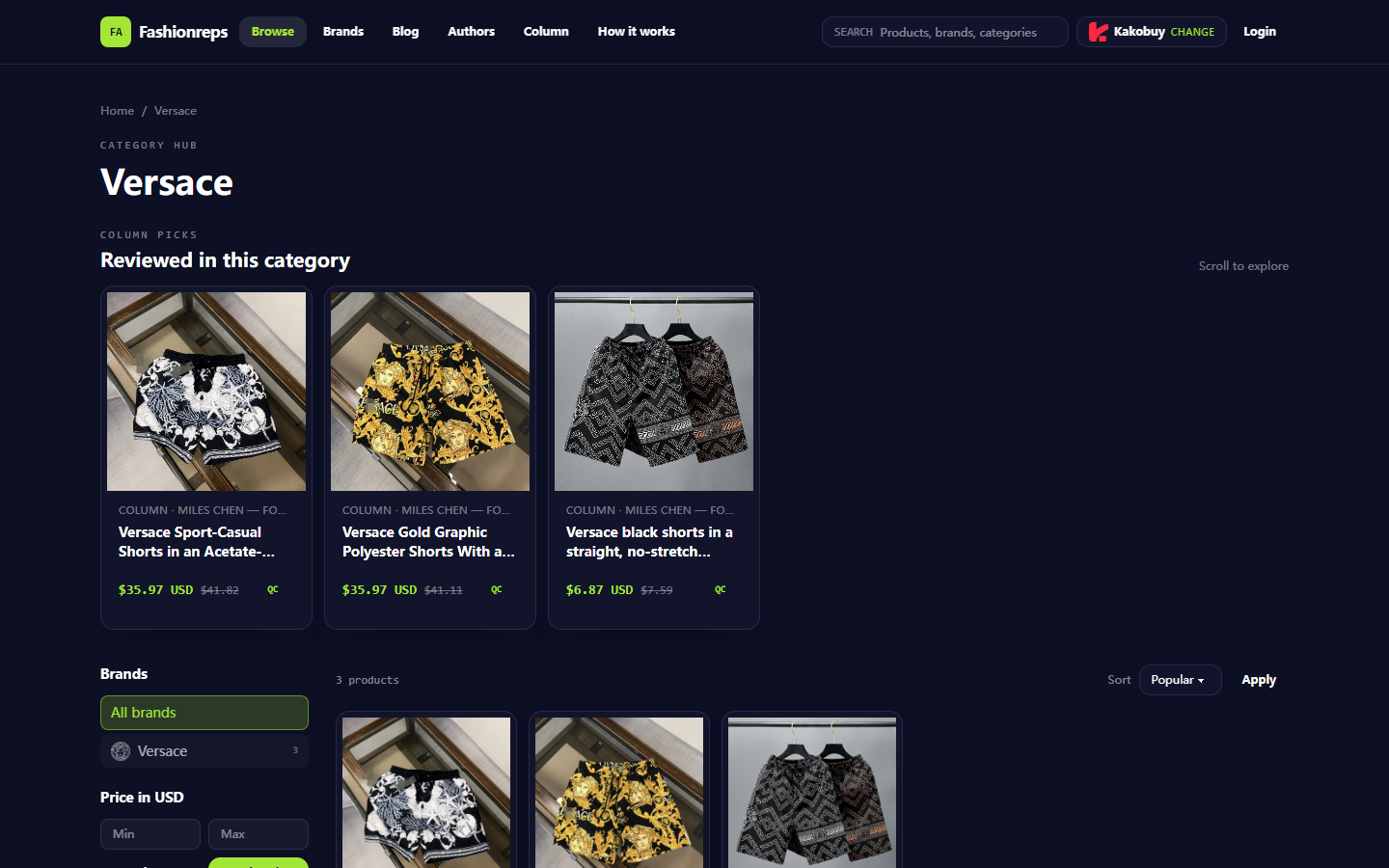
The provided catalog verification records show that the Versace category page on fashion-reps listed 3 products at the time, displaying product title, reference price, size range, material description, and QC mark. If you find mismatches between the fashionreps catalog and Google Sheets in title, specs, or product links, do not proceed with the order or treat the sheet record as the latest fact. The process below addresses on
Editor score 4.2 / 5
The provided catalog verification records show that the Versace category page on fashion-reps listed 3 products at the time, displaying product title, reference price, size range, material description, and QC mark. If you find mismatches between the fashionreps catalog and Google Sheets in title, specs, or product links, do not proceed with the order or treat the sheet record as the latest fact. The process below addresses only one question: confirm whether the product in the sheet still corresponds to the same product in the catalog. 🔎

Define the scope of troubleshooting for Versace product spec and link mismatches
Common situations include: the sheet states one material, but the catalog title shows another; the sheet retains an old price while the page shows a new reference price; the size range differs between the two sources; the original link redirects to the brand category page, an empty page, or a different product.
The goal of this check is not to judge product authenticity, quality, or final purchase value, but to confirm four things:
- Whether the sheet record points to a currently accessible product page
- Whether the page title, color, size, and material match the sheet
- Whether the link still leads to the same product after redirect
- Which fields are sufficient to confirm, and which fields require pausing and re-verification
The information displayed on the page only represents the current visible content. Prices, inventory, sellers, size availability, and link status may change. Do not treat a value recorded in the sheet as a continuously valid purchase fact just because it was recorded before.
Return to the fashionreps catalog to confirm candidate products, page status, and current links
First, re-locate the candidate products from the Versace category page on fashion-reps. Do not directly rely on links that have been copied multiple times in Google Sheets. The provided catalog records show three types of title information: acetate-blend fabric athletic leisure shorts, gold graphic polyester straight-leg shorts, and black, non-stretch polyester straight-leg shorts. The reference prices on the page are $35.97, $35.97, and $6.87 respectively, and the page also shows corresponding previous reference prices. ⚠️ These values are only for this verification record and cannot be used as current transaction prices or inventory commitments.
After opening the candidate page, first check:
- Whether the page loads normally instead of staying on a category page, login page, or error page
- Whether a clear product name appears
- Whether there are enough visible specs to support item-by-item comparison
- Whether the page displays QC or other sections related to product details
- Whether the page URL remains stable after redirect
If the category page still shows 3 candidate products, but a sheet link opens a different product, do not rely on title similarity to confirm. Similar brand, similar color, or same price are not sufficient to prove that two records belong to the same product.
Record title, color, size, images, and spec fields item by item
Break down page facts into separate fields, and record only what the page explicitly displays. Do not write editorial judgment into product fact columns, and do not write speculation from images as material or size conclusions.
It is recommended to record at least the following fields:
| Field | Recording method | Action when discrepancy occurs |
|---|---|---|
| Product title | Copy the page title as-is | First confirm if it's the same model, then check color and fit |
| Color and pattern | Record only the color or pattern explicitly stated on the page | Pause judgment if image and text conflict |
| Material | Use the page's original text; do not add your own feel or composition | Leave blank and seek help if missing or inconsistent before/after |
| Size range | Record the minimum and maximum sizes listed on the page | Do not treat sheet-derived values as page sizes |
| Reference price | Record amount, currency, and verification date | Update old value when changed, but do not overwrite original record |
| Current URL | Save the final address that opens and displays product information | Mark as pending verification if it redirects to category page or empty page |
Images can help confirm obvious differences in color, pattern, or fit, but cannot alone prove material, size, or authenticity. In particular, do not treat product display images as actual QC images, and do not claim to have touched, worn, or received the product for verification. 📋
Create columns for differences, source page, and update time in Google Sheets
The sheet should at least retain the original value and the latest verified value to avoid losing traceability after overwriting. You can use the following column structure:
- product_key: internal ID maintained by the sheet
- sheet_title: original sheet title
- page_title: current page title
- sheet_url: original sheet link
- checked_url: final address after opening this time
- sheet_color: sheet color
- page_color: page color
- sheet_size: sheet size range
- page_size: page size range
- sheet_material: sheet material
- page_material: page material
- pagepriceusd: reference price shown on the page
- sourcecheckedat: verification date and time
- difference_status: consistent, partially inconsistent, unconfirmable, or broken link
- next_action: continue verification, seek support, or suspend operation
The difference status should be generated from field comparison, not from a visual judgment of the entire row. For example, if the title is consistent but the size is different, mark it as "partially inconsistent"; if the page cannot load, do not mark it as "consistent" but as "broken link" or "unconfirmable". ✅
You can break down the judgment into simple rules:
- Title, color, size, and material all match, and the link directly opens the same product page: tentatively mark as consistent
- Only price changes: retain old value, update latest verified value, and note price fluctuation
- Title similar but color, size, or image inconsistent: mark as partially inconsistent
- Page lacks clear product name or insufficient specs: mark as unconfirmable
- Link redirects to category page, empty page, or another product: mark as broken link
Check whether the link still points to the same product after redirect
Copy the original URL from the sheet, open it in a new browser tab, and record the final address. Then return to the top of the page and confirm the product name and specs, not just the address bar.
Check in order:
- Whether the original URL loads a specific product page.
- Whether the page automatically redirects to the brand category page or homepage.
- Whether the final page title corresponds to the sheet title.
- Whether the color, pattern, size, and material on the page can match the sheet item by item.
- Whether the page still shows the same product after refresh.
- Whether you can find the same candidate product again after navigating back to the category page via in-page navigation.
If only the URL changes but the page content still clearly corresponds to the same product, you can save both the original URL and the final URL, and use the final URL as the verified address for this check. If the final page shows a different Versace shorts, do not merge records just because the brand is the same.
Distinguish between page-visible facts, sheet records, and editorial judgment
To avoid propagating errors, it is recommended to divide information into three layers:
- Page-visible facts: the title, color, size, material, reference price, and accessibility status currently displayed on the page.
- Sheet records: content entered by the team in the past, which may be outdated but must be retained for comparison.
- Editorial judgment: e.g., "possibly an old link", "possibly an updated page for the same model", or "images look similar". These must be placed in a separate notes column, not written into fact columns.
"Images look the same" does not mean "specs are the same"; "same price" does not mean "same product". If the page only shows partial information, explicitly record the missing fields without filling in from model memory or competitor pages. 🧭
Stop conditions when page updates or fields are missing
If any of the following occurs, suspend purchase, order import, or further consolidation as a confirmed product:
- The original link opens a category page, error page, or blank page
- The page does not have a clear product name
- The title and image clearly correspond to different colors, patterns, or fits
- The size range cannot be confirmed, or the sheet size exceeds the page display range
- The material field is missing, but the sheet lists the material as a definite fact
- The page price has changed but there is no new verification time
- The same URL shows different products at different times
- The page requires entering an external purchase agent to see key specs, but this information has not been verified
Stopping does not mean the product is necessarily problematic, only that the evidence is insufficient to support the next step. Keep the original record and screenshot information, and avoid filling in guesses to make the sheet "look complete".
Organize screenshots and link evidence before seeking support from the target site
If the page remains unconfirmable, when asking for help from fashion-reps support, prepare a concise evidence package: original URL, final URL, corresponding sheet row, page title, fields with discrepancies, verification time, and necessary screenshots. Screenshots should cover up order numbers, addresses, phone numbers, payment information, and other personal data; do not publicly share complete shipping labels or account credentials.
The problem description should be specific to the field, for example: "The sheet records black non-stretch polyester straight-leg shorts, but opening the original link shows a category page, and I cannot confirm whether it still corresponds to the original product." Do not just write "broken link" or "specs wrong", as support staff will have difficulty locating the record.
Checklist for continuing purchase or suspension after completing the review
After completing the field comparison, divide the candidate products into two groups:
Conditions for continuing verification or entering purchase preparation are: the product page is accessible, the title and key specs correspond, the final URL is saved, price and verification date are recorded, and there are no unexplained conflicts in color, size, or material.
Conditions for suspension are: the link cannot point to a specific product, the page information is insufficient, there are substantial conflicts between fields, or the old record in the sheet cannot be traced to its source. When suspending, retain the difference record instead of deleting the original row.
This method does not save a fixed amount of money, but reduces repeated searches, incorrect orders, and subsequent communication costs caused by wrong links; the cost is spending a few more minutes verifying field by field and accepting the risk that prices, inventory, and page status may continue to change. It is more suitable for users who need to maintain product catalogs, share Google Sheets among multiple people, or need to preserve an evidence chain before purchasing. It is not recommended to proceed based solely on this link comparison when page information is clearly missing, when rushing to buy and cannot complete the review, or when judgment of authenticity, quality, and physical feel is needed.