Represent Pants: Size & Link Checks on FashionReps
| Published | |
|---|---|
| Revised | |
| Editors | Maya Chen Editor-in-Chief |
Clarify the Task of Verifying represent Pants Sizes and Links If you're preparing to sort through represent pants candidates, what you really need to solve isn't "which spreadsheet is better to use," but whether you can match the same item's brand, style, color, size information, and original link one-to-one, and finally go back to the product page to confirm the size chart and available purchase entry. This article applies to three situations: temp
Editor score 4.2 / 5
Clarify the Task of Verifying represent Pants Sizes and Links
If you're preparing to sort through represent pants candidates, what you really need to solve isn't "which spreadsheet is better to use," but whether you can match the same item's brand, style, color, size information, and original link one-to-one, and finally go back to the product page to confirm the size chart and available purchase entry.
This article applies to three situations: temporarily screening one or two pairs of pants, organizing a batch of candidate items, and multiple people maintaining selection data long-term. It does not apply to judging sizes based solely on product titles, inferring fabric based solely on images, or confirming stock, price, and variants without opening the product page.
After reading, you should be able to:
- Find candidate items from fashionreps' website-style product catalog.
- Organize candidate records into Google Sheets.
- Use unified fields to compare brand, style, color, size, and link.
- Go back to the product page to check whether the size chart, variants, and link still correspond.
- Mark fields that have been verified, need additional information, and cannot be confirmed.
Product prices, stock, size options, seller information, shipping, and link status may change. Before ordering, you should reopen the page to verify, and you cannot treat old records in the spreadsheet as current facts. 🧭

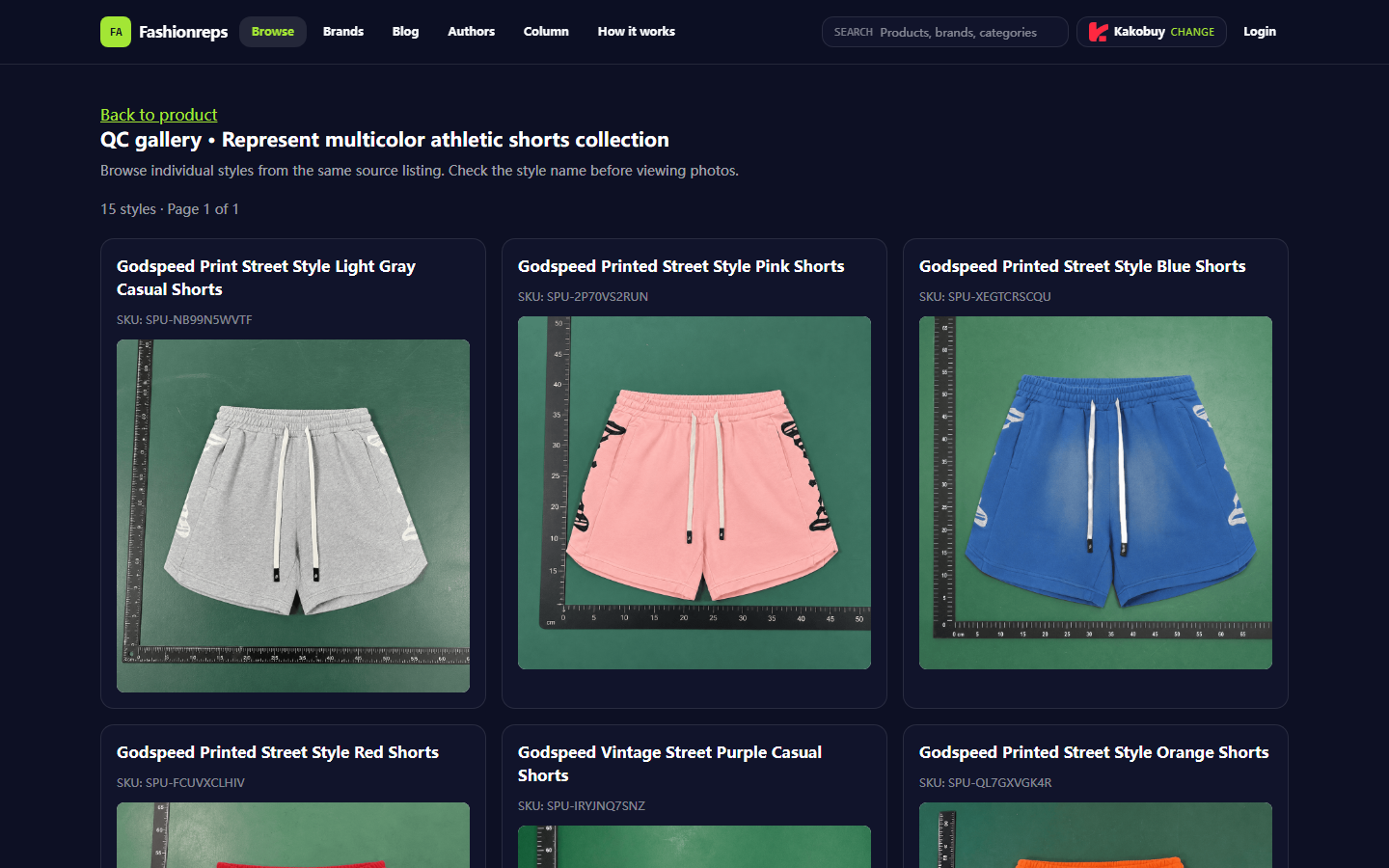
Figure: Example of fashionreps website-style product catalog and QC page. The image is used to illustrate page navigation and product card verification methods, and does not represent any conclusion about size, stock, or product quality without reopening the page to confirm.
Verify Visible Product Cards in fashionreps Website-Style Spreadsheet
fashionreps' visible structure is more like a product catalog: users can enter content from Browse, Brands, Blog, Authors, and Column, and can also use search and product categories to discover candidates. Product cards are usually suitable for first observing the product name, collection relationship, SKU, or accessible QC page, then opening the specific entry to continue confirmation.
In a website-style catalog, don't immediately copy all links as the first step. First determine whether the card is an independent product, a collection page, a style index page, or a QC image gallery entry. A collection may contain multiple colors or styles, and if you directly treat the collection page as the purchase link for a specific color, misalignment will easily occur later.
It's recommended to check in the following order:
- Record the brand and product title displayed on the page.
- Determine whether the title describes pants, shorts, sweatpants, or another pants category.
- Check whether there are color, style, or size fields.
- Record the SKU, product number, or other identifying information displayed on the page.
- Open the product page or QC page to confirm the link points to the same entry.
- If the page only displays an image collection, temporarily mark the size as "to be confirmed on product page."
QC images can help you identify the style or color corresponding to the page, but the images themselves cannot prove that the size is suitable, the fabric feel, stock status, or actual quality. Don't write image observations as having tried on or touched the product. 🔍
Create Brand, Style, Color, Size, and Link Columns in Google Sheets
Google Sheets is better suited to turning scattered candidates into a filterable, supplementable, and collaborative verification list. The focus of the spreadsheet is not to copy more fields, but to make each row represent only one clear verification object.
Recommended fields:
| Field | How to Fill In | Verification Focus |
|---|---|---|
| Brand | Fill in according to the name visible on the product page | Don't infer the brand based solely on images or tags |
| Product Name | Keep the original page name or a short standardized name | Avoid treating a collection name as a single item name |
| Category | Pants, shorts, sweatpants, etc. | Based on visible page information |
| Style | Cut, series, or style name | Needs to correspond to the product page |
| Color | Fill in according to the page or variant display | Don't judge based only on the main color in photos |
| Size Information | Record the size range or size chart status | Mark "to be confirmed" when the size chart has not been opened |
| Product Link | Save the specific product page address | Don't use a search results page as a substitute |
| QC Link | Record only when provided on the page | Save separately from the product link |
| Verification Status | Confirmed, pending open, insufficient information | Facilitates subsequent filtering |
| Verification Date | Record the date the page was actually opened | Helps identify old data |
| Notes | Record missing fields or conflicts | Don't write unverified conclusions |
If a page contains multiple colors or styles, it's best to split them into multiple rows and save the corresponding specific link for each row. Only when the page explicitly treats multiple variants as the same product and the links are indeed consistent can you merge records.
Google Sheets filters can help you first filter rows where "category is pants, brand is represent, verification status is pending confirmation," then go back to the website one by one to complete the data. When collaborating with multiple people, it's recommended to use a notes or status column to record who completed which step, to avoid two people repeatedly opening and modifying the same record.
Compare Website Browsing and Spreadsheet Filtering Steps for the Same Batch of Candidates
The website catalog and Google Sheets solve problems at different stages. The website is suitable for discovering and reviewing original pages, while the spreadsheet is suitable for organizing, comparing, and tracking gaps. Don't treat one tool as a substitute for the other.
| Task | fashionreps Website-Style Catalog | Google Sheets |
|---|---|---|
| Discover candidates | Browse via navigation, search, brand, or product catalog | Not suitable for discovering products from scratch |
| View page context | Can return to product page, collection page, or QC page | Can only save recorded information from the page |
| Compare multiple candidates | Requires opening pages back and forth | Can filter by brand, color, status, and size |
| Check links | Open the current page directly | Centrally save and mark link status |
| Supplement verification records | Page information is scattered in different locations | Can uniformly record dates, notes, and responsible persons |
| Collaborate on organization | Depends on each person browsing separately | Can share filter conditions and status columns |
A reliable workflow is: first discover candidates on the website, then add candidates to the spreadsheet; then filter conditions in the spreadsheet to batch-check pages; after completing verification, update the status. This preserves the original page and avoids filling in fields from memory. 📋
Go Back to the Product Page to Check Size Chart, Variants, and Link Correspondence
After filling in the basic fields, you must return to the specific product page for a second verification. This step determines whether the spreadsheet can support pre-order judgment.
Focus on checking four pairs of relationships:
- Whether the brand and product title are consistent.
- Whether the product name and color or style are consistent.
- Whether the size chart belongs to the current product, not another style in the same collection.
- Whether the product link still opens the correct page, not a redirect, empty page, or other entry.
When verifying sizes, prioritize recording the measurement items actually provided on the page, such as waist circumference, pants length, hip circumference, or other dimensions. Don't convert letter sizes directly into fixed centimeters, and don't apply size experience from other brands to the current product. If the page only shows options like S, M, L, but no size chart, mark it as "has size options, missing measurement data."
If the page provides multiple colors or styles at the same time, first select the target variant, then view the size chart and purchase entry. After switching variants, the page title, images, stock, or link may change, so you cannot assume all variant information is the same after opening the page only once.
Do not mark a record as confirmed in the following situations:
- The product page cannot be opened or appears empty.
- The page only has a collection title, with no clear single item name.
- Images, title, and link point to different styles.
- The size chart appears to belong to another product.
- The color name cannot be matched to a page variant.
- The page information is insufficient to determine the specific purchase entry.
Distinguish Displayed Fields, Pending Open Pages, and Uninferable Information
To reduce mistaken orders, it's recommended to divide information into three layers: displayed, pending open, and uninferable.
Displayed information includes the product name, brand, SKU, images, visible variants, or links directly presented on the page. Pending open information includes product details, size charts, specific colors, and purchase entries that have not yet been entered. Uninferable information includes wearing effect, actual fabric feel, real stock stability, final shipping costs, taxes, and customs clearance results.
You can use three statuses in the spreadsheet:
- Confirmed: page opened, fields correspond to the target product.
- Pending confirmation: clues appeared in the catalog, but product page verification is not completed.
- Insufficient to judge: the current page does not have enough information to support a conclusion.
This classification is more useful than writing "looks okay" in notes, because it clearly indicates whether the next step is to continue opening the page, supplement data, or stop inferring. ⚠️
Choose Single Search, Long-Term Organization, or Combined Use
If you only want to find one represent pants candidate, it's usually faster to directly use website search and product catalog. After finding the page, you should still open the specific product page to confirm the size chart and link.
If you need to compare multiple colors, styles, or different page sources, Google Sheets is better for building a unified list. The spreadsheet can help you filter entries missing size charts, and quickly find duplicate links, blank fields, and expired verification dates.
If you need long-term organization, the most reliable is combined use: the website is responsible for discovery and providing original context, and Google Sheets is responsible for recording and collaboration. Don't treat the results copied into the spreadsheet as permanently valid, especially when prices, stock, size options, and page links change.
Save Verification Results and Decide to Supplement Data or Proceed to Order
After completing verification, you can process each row in the following order:
- Confirm that this row corresponds to only one product or one clear variant.
- Check that brand, category, style, and color come from the same page relationship.
- Open the size chart and record actual measurement items; if there is no size chart, keep the gap.
- Open the product link to confirm there is no redirect to an incorrect entry or empty page.
- Fill in the verification date and status.
- For entries with insufficient information, supplement page data or exclude them from order candidates.
- Before ordering, re-check the current page's price, stock, variants, shipping, taxes, and after-sales conditions.
This method saves time on repeated searching and organizing, but increases the risk that the spreadsheet may become outdated as pages change, or that collection pages and single item pages become misaligned. It is suitable for people who need to compare multiple candidates, collaborate with multiple people, or maintain data long-term; it is not recommended to order directly based on it without reopening the product page, confirming the size chart, or having only image clues.