Lacoste Hoodie Picks: Save Size Evidence in Google Sheets
| Published | |
|---|---|
| Revised | |
| Editors | Maya Chen Editor-in-Chief |
If you're compiling a Lacoste fall/winter hoodie from fashionreps, the easiest thing to miss isn't the color—it's the size evidence. The catalog is great for discovering candidates, reviewing images, and entering QC pages; Google Sheets is great for pinning down product identity, variants, and information still needing verification. The two should be used separately, not by treating the catalog page as a complete product file. ## First, confirm what the catalo
Editor score 4.2 / 5
If you're compiling a Lacoste fall/winter hoodie from fashionreps, the easiest thing to miss isn't the color—it's the size evidence. The catalog is great for discovering candidates, reviewing images, and entering QC pages; Google Sheets is great for pinning down product identity, variants, and information still needing verification. The two should be used separately, not by treating the catalog page as a complete product file.
First, confirm what the catalog page can prove
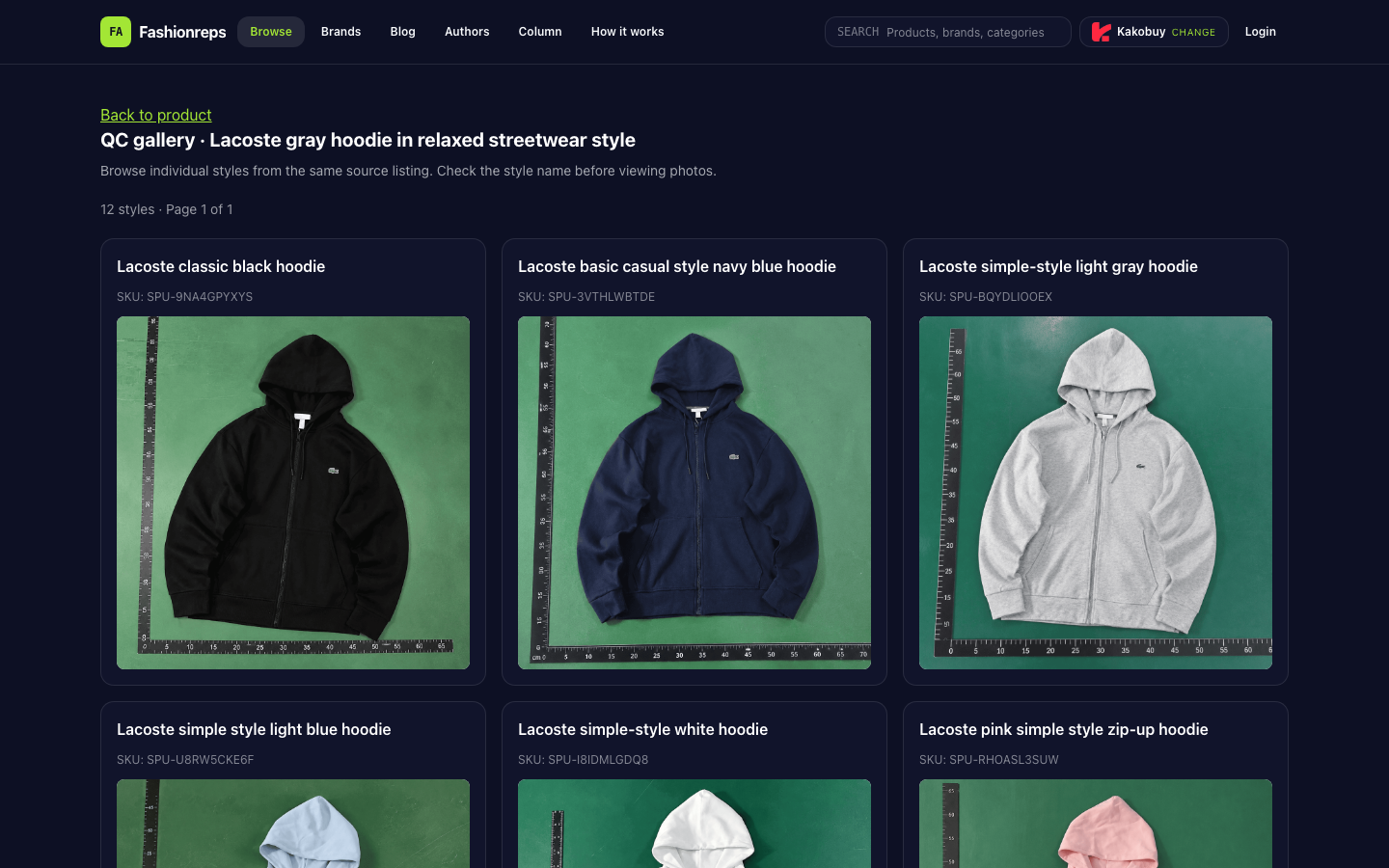
As of October 28, 2026, the Fashionreps Lacoste QC page shows 12 style entries under this source, along with corresponding product titles and SKUs. Visible entries include a black classic hoodie, navy basic casual hoodie, light gray minimalist hoodie, light blue minimalist hoodie, white minimalist hoodie, pink zip-up hoodie, and pink minimalist crewneck; the page also lists other styles such as black pants, navy sweatpants, light blue sweatpants, and pink sweatpants.
This type of page can help you confirm candidate names, color descriptions, SKUs, and QC entry points, and also remind you that multiple color or style variants may exist under the same source. But the currently verifiable text does not provide specific size charts, measured garment length, chest width, shoulder width, stock, price, shipping, or purchase results. Therefore, you cannot rely solely on catalog entries to determine whether a certain size exists, fits, or is still available for purchase.
Boundaries between catalog browsing and Google Sheets
| Task | fashionreps catalog or product page | Google Sheets |
|---|---|---|
| Discover candidates | Browse titles, colors, styles, and same-source entries | Save already discovered candidates |
| View evidence | Open product images, QC images, and page entry points | Record whether images were viewed and whether evidence is complete |
| Verify sizing | Look for size information on the actual product detail page; mark as missing if not seen | Record size charts, measured data, source location, and query time |
| Manage variants | Distinguish entries by different style titles and SKUs | Split color, style, and SKU into filterable fields |
| Handle uncertainties | Go back to original page for further checks | Mark pending information, exclusion reasons, and review status |
| Collaborate and review | Rely on reopening pages | Make it easy for multiple people to supplement and filter by fields |
The catalog provides raw leads; the spreadsheet preserves the judgment process. Content in the spreadsheet cannot replace original page evidence; if sizes, images, or links change, you should still return to the page to re-verify.
Recommended workflow for a single organizing task
1. Build candidates first, don't rush to conclusions
On the catalog or QC page, record visible product titles, colors, SKUs, and page URLs one by one. Don't use "Lacoste hoodie" as the sole name, because the same source may include regular pullovers, zip-ups, and other clothing categories at the same time. The closer the title is to the original page text, the less likely you are to mix up colors or styles later.
2. Create a separate row for each color or style
Don't merge black, navy, light gray, and light blue into one "Lacoste hoodie." Entries on the same source page each have their own SKU, and color changes may also come with changes in cut or details. It's recommended to use at least the following fields:
- Product title
- Brand
- Category
- Color
- Style type
- SKU
- Product page URL
- QC page URL
- Image viewed
- Size information status
- Query time
- Pending information
- Exclusion reason
Among these, "Product title" and "SKU" confirm identity, "Color" and "Style type" are for filtering, and "Size information status" prevents a candidate from being mistakenly judged as selectable when evidence is lacking.
3. Separate size evidence specifically
Don't just write "has sizes" or "fits a certain height." A more reliable recording method is to distinguish evidence types:
- Not found: size information has not yet been seen on the page.
- Has size chart: record whether the page provides sizes like S, M, L and corresponding measurements.
- Has measurement photos: record whether QC images show tape measurements and which items are measured.
- Needs review: images blurry, fields incomplete, or page cannot be opened.
- Excluded: product identity cannot be confirmed, or key evidence has been missing long-term.
The current source text supports QC image entry points and multiple Lacoste style entries, but does not directly provide size numbers. Therefore, the spreadsheet should first be marked as "to be verified on product detail page or QC images," and you should not write in sizes on your own.
4. Use QC images to verify visible information, not to infer quality
QC pages are suitable for checking whether images correspond to the target style, whether colors match titles, whether there are recognizable details, and whether image entry points are still valid. Images can be part of product evidence, but you cannot infer fabric weight, warmth, authenticity, or actual wearing effect from page text or a single image alone.
If images cannot be opened, do not match titles, or only confirm the brand but not the specific style, write the issue clearly in "Pending information" and postpone inclusion in the final candidate list.
5. Set three statuses: include, supplement, and stop using
Candidates don't have to have only two outcomes, "keep" and "delete." You can use three statuses:
- Include candidate: title, color, SKU, page entry, and at least one corresponding image evidence can match each other, and size information is recorded or explicitly marked as pending verification.
- Review after supplementing: product identity is basically clear, but size, images, or page entry are still incomplete.
- Stop using: link is broken, page cannot confirm product identity, or evidence clearly conflicts with records.
"Stop using" doesn't mean the product definitely doesn't exist; it only means current evidence is insufficient to support continued use as a reviewable candidate. If new valid pages are found later, create a new review record or supplement the query time; don't silently overwrite the original judgment.
Minimal structure worth keeping in Google Sheets
If you're only organizing a small number of candidates, you don't need to build a complex database. One row per color or style variant, keeping at least the following information:
| Field | Key points to fill in |
|---|---|
| Product identity | Page title, brand, category, SKU |
| Variant info | Color, style type, and pattern or details if necessary |
| Evidence record | Product page, QC page, whether images viewed |
| Size status | Not found, has size chart, has measurement photos, needs review |
| Time and responsibility | Query time, last reviewer |
| Processing result | Include candidate, review after supplementing, stop using |
| Notes | Missing fields, conflicting information, or exclusion reasons |
Keeping "Query time" is important because page content, image entry points, and availability status may change. The date itself doesn't prove the product is still purchasable, but it helps you judge whether the record needs re-verification.
Final judgment: preserve evidence first, then discuss size selection
For Lacoste hoodie candidates, the fashionreps catalog is suitable for discovering entries, viewing same-source variants, and returning to QC images; Google Sheets is suitable for preserving each variant's identity, size evidence status, and subsequent processing results. Before truly entering the candidate list, you should at least record title, color, SKU, image entry, and size evidence status for each item.
Current page evidence can support candidate discovery and variant organization, but not price, stock, shipping, specific size numbers, or fit judgment. When such information is missing, the most reliable approach is to mark it as pending rather than filling in from experience. This way, the compiled spreadsheet is suitable for review and will not mistake catalog leads for verified purchase advice.
Article image
