Celine Scarf Coupon Check Before Checkout
| Published | |
|---|---|
| Revised | |
| Editors | Maya Chen Editor-in-Chief |
Define the verification task This verification aims to confirm whether the coupon actually applies before purchasing a Celine Fall Winter scarf, and to obtain the final amount due shown on the checkout page. The actions you need to complete include: recording product page information, checking the coupon entry and rules in your current shopping agent account, examining thresholds and exclusions, and finally reading back the discount, currency, service
Editor score 4.2 / 5
Define the verification task
This verification aims to confirm whether the coupon actually applies before purchasing a Celine Fall Winter scarf, and to obtain the final amount due shown on the checkout page. The actions you need to complete include: recording product page information, checking the coupon entry and rules in your current shopping agent account, examining thresholds and exclusions, and finally reading back the discount, currency, service fee, packaging fee, and total due on the checkout page.
This article applies to buyers who have already found a specific product and are ready to enter the shopping agent checkout process. It does not apply to situations where there is no product page, no access to the agent account, or where one hopes to obtain discounts by fabricating coupon codes or circumventing platform restrictions. Coupon rules may change over time, by account, region, and order status, and should be re-verified before publishing.
Fashionreps is positioned as a product discovery and purchase process information portal. Purchases, payments, and logistics for items on the site are handled by external shopping agents selected by users, so the visible reference prices on Fashionreps pages cannot be directly considered as the final order amount. 🧾

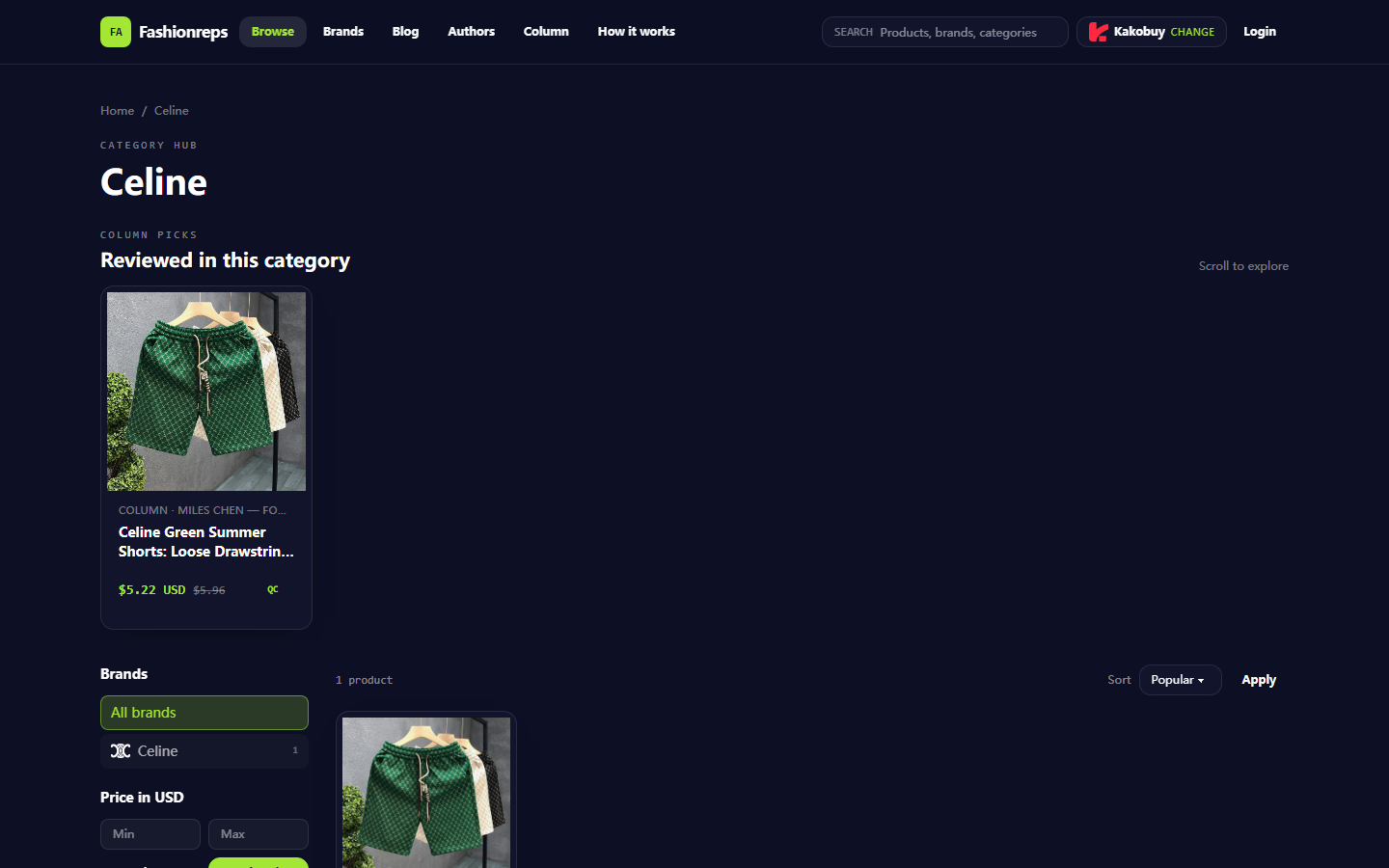
Image: Example of Fashionreps brand catalog page. This image is used to illustrate the product discovery entry and does not serve as proof of Celine Fall Winter scarf inventory, price, or coupon applicability.
Record the style, color, size, and visible price on the product page
First open the specific product page, not just stay on the brand category page. Record the following information:
- Product name and page title
- Style or series name
- Available colors
- Available sizes or dimensions
- Product price displayed on the page
- Original price, reference price, or promotional price displayed
- Page update time or current query time
- Whether the product page has purchase buttons, seller information, and available images
The current verification materials only show an example of Fashionreps' Celine category page, where a Celine green summer shorts is visible, with a reference price of 5.22 USD, and a previous reference price of 5.96 USD. This page cannot prove the price, inventory, material, color, size, or discount eligibility of a Celine Fall Winter scarf, nor can it replace checking the specific scarf product page.
Therefore, if the specific scarf product page does not have a clear name, visible price, and valid purchase entry, you should postpone checkout. Do not fill in the category page's reference price into the order, and do not infer the scarf's material or size from images. 🔎
Find the current coupon entry and applicable instructions on the target website
From the purchase button on the product page, enter the selected shopping agent. After logging in, check the following locations:
- Homepage or account center's Coupon, Coupons, Vouchers, or coupon entry
- Available discount prompts on the shopping cart page
- Coupon selection box on the checkout page
- Applicable products, regions, and account instructions on the promotion page
- Discount details and usage conditions on the order confirmation page
The Fashionreps page allows users to choose a shopping agent, and the product purchase button redirects to the selected agent. Different agents have independent coupon systems, and Fashionreps' product discovery page does not provide directly verifiable universal coupon codes. There is currently insufficient official information to prove that a specific coupon applies to this scarf, nor is there a basis to guarantee a fixed discount or savings amount.
After finding a coupon, save its complete rules page or the terms displayed within the account, including coupon name, discount method, applicable currency, minimum order amount, validity period, applicable region, and exclusions. Do not save only the coupon code itself, because whether the code can be used usually depends on order conditions. 📌
Verify minimum amount, category restrictions, brand exclusions, and validity period
At minimum, check the following items for coupon applicability:
- Whether the minimum amount is based on product amount only, or includes service fees and shipping
- Whether Celine or scarf items are listed as excluded brands or categories
- Whether the promotion only applies to first-time orders, designated accounts, or designated regions
- Whether a specific payment method or settlement currency is required
- Whether the validity period is calculated based on the account's time zone or the agent platform's displayed time zone
- Whether usage frequency is limited per user
- Whether only one coupon can be used per order
- Whether special-priced items, pre-sale items, or external link items are excluded
You can use the following verification record to avoid mistaking assumptions for rules:
| Verification Item | What to Record | Current Conclusion |
|---|---|---|
| Product Amount | Amount shown on specific scarf product page and in cart | Need to enter specific product page to confirm |
| Category and Brand | Whether terms include scarf, Celine, or related exclusions | Currently unable to confirm |
| Minimum Amount | Threshold amount, currency, and calculation basis | Currently unable to confirm |
| Validity Period | Start time, end time, and time zone | Currently unable to confirm |
| Account Restrictions | New users, regions, payment methods, or usage limits | Currently unable to confirm |
If the terms only say "applicable to some items" without an item list, mark the discount eligibility as unconfirmed. Do not assume that a final discount will definitely be applied just because a selectable coupon appears on the checkout page; some systems may display the coupon first and validate restrictions before submitting the order. ⚠️
Check whether the coupon can stack with other fees or promotions
Before checkout, review product discounts, coupon discounts, service fees, packaging fees, domestic shipping, international shipping, and possible taxes. Common coupon calculation methods may differ:
- Only offsets product amount
- Offsets product amount and some service fees
- Calculated based on order subtotal, but does not offset international shipping
- Stacks with product promotional price, but cannot stack with another coupon
- Reduces a fixed amount only after meeting a threshold
Do not determine stacking relationships based solely on words like "discount" or "save" on the page. Record amounts before and after applying the coupon to confirm which item the change occurred in. If service fees, packaging fees, or shipping fees do not change, do not attribute the entire total decrease to the coupon.
Read back discount, currency, and final amount due on the checkout page
After entering the final confirmation page, check in the following order:
- Product name, color, size, and quantity still match the records from the product page.
- Product subtotal matches the cart amount, or differences can be explained.
- Coupon name or code appears in the discount details.
- Discount amount is in the correct currency and not misread due to exchange rate conversion.
- Service fees, packaging fees, domestic shipping, and international shipping are listed separately.
- Whether taxes or import fees are included or to be borne separately by the recipient.
- Final amount due matches the payment page amount.
- Save a record or screenshot without personal sensitive information before submitting the order.
If the checkout page only shows "applied" but no discount amount, treat the coupon as unverified. If the coupon disappears after selection, the amount does not change, or the page indicates the product is not eligible, stop submitting the order and record the prompt text. Do not click submit repeatedly to avoid duplicate orders. ✅
Distinguish facts, calculated results, and unverifiable assumptions
Page facts include product page displayed name, price, options, coupon terms shown on account pages, and fees listed on checkout page. Calculated results include product subtotal, discounted amount, and total due after adding all fees. Unverifiable assumptions include "this coupon should apply to all Celine items," "scarves definitely belong to apparel category," "coupon can offset international shipping," or "no other fees will be incurred after checkout."
It is recommended to use three labels in records:
- Verified: clearly displayed on the page and can be read again after refreshing or returning to the page
- Calculated: calculated by yourself based on verified amounts
- To be confirmed: incomplete terms, not displayed on page, or need confirmation from agent customer service
Only when product information, coupon rules, and checkout amount all reach "Verified" status is it appropriate to proceed with payment. Taxes, import restrictions, and customs clearance responsibilities should still be confirmed according to the destination country's regulations, and costs cannot be reduced by underreporting, splitting orders to avoid taxes, or evading inspections. 🌍
Save query time and decide to proceed or postpone
Records should at least include query date, query time, destination country or region, settlement currency, selected shopping agent, product page visible price, coupon terms, checkout page discount, service fees, packaging fees, shipping fees, and final amount due. The verification date for this article is October 19, 2026, but this does not mean that a usable coupon code or fixed discount existed on that day; actual orders still require re-confirmation in the account and checkout page.
Conditions to proceed with the order: specific scarf product page information is complete, coupon terms are clear, no brand or category exclusions, threshold and validity period meet requirements, discount is actually shown on checkout page, and currency and final amount due have been read back.
Conditions to postpone: only category page without specific scarf product page, coupon lacks complete applicable instructions, whether Celine or scarf category is excluded cannot be confirmed, no actual discount shown on checkout page, or service fees, packaging fees, shipping fees, and tax responsibilities are still unclear.
When there is no verifiable coupon code or discount, the safest result is not to guess savings, but to keep the current cart and re-check terms and checkout page before deciding. This avoids mistaking nominal discounts for actual savings and reduces the risk of duplicate orders or cancellations due to inapplicable rules.