Celine QC Entry Not Found: Verify Product, Button, Path
| Published | |
|---|---|
| Revised | |
| Editors | Maya Chen Editor-in-Chief |
## This article addresses the troubleshooting task of missing QC entry for celine products On Fashionreps' Celine product page, if you cannot see the QC entry, no photos appear after clicking, or the page returns an error, do not immediately conclude that the product has passed inspection or that the platform is malfunctioning. This article only addresses one issue: the QC entry on the product page is missing or cannot be opened. After reading, you should be able to accomplish three things: conf
Editor score 4.2 / 5
This article addresses the troubleshooting task of missing QC entry for celine products
On Fashionreps' Celine product page, if you cannot see the QC entry, no photos appear after clicking, or the page returns an error, do not immediately conclude that the product has passed inspection or that the platform is malfunctioning. This article only addresses one issue: the QC entry on the product page is missing or cannot be opened.
After reading, you should be able to accomplish three things: confirm that the product page corresponds to the correct style, record the actual status of the View QC Photos button, and determine whether to contact the shopping agent, Fashionreps, or postpone your order. This article does not apply to orders that have already entered the agent's warehouse but where the QC cannot be viewed from the warehouse backend, nor does it replace the agent website's order rules.

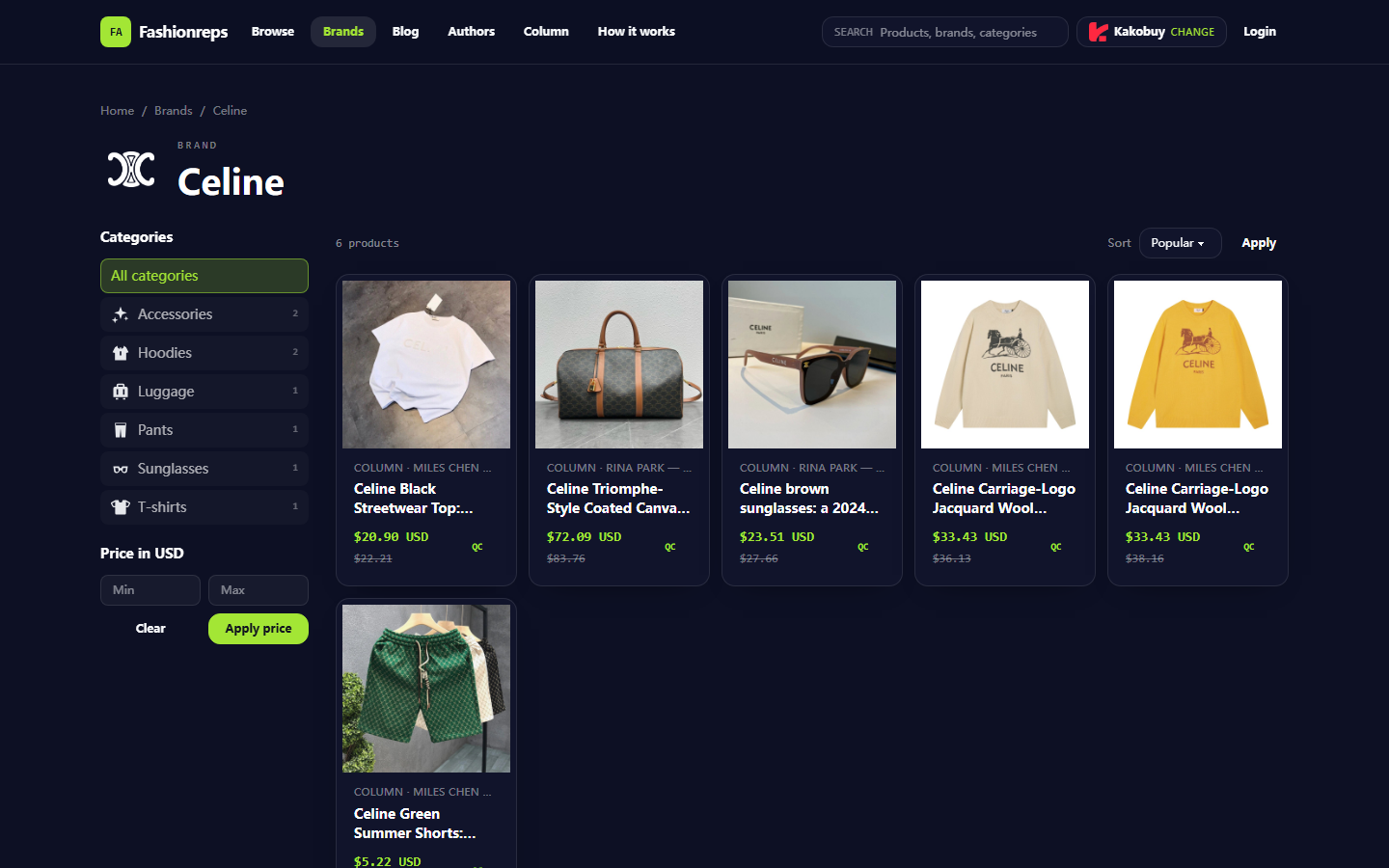
Figure: Illustration of Fashionreps' Celine brand catalog; the catalog entry and the QC page in the order warehouse are not the same page.
Confirm style, color, and size from the fashionreps product detail page
First, go back to the product detail page; do not continue from the old QC page in your browser history. Fashionreps' Celine catalog contains multiple different categories of products, including tops, travel bags, sunglasses, sweaters, and shorts. Products under the same brand do not share the same QC record, so you must first confirm the product itself.
Check in the following order:
- Does the product title match the style you intend to purchase?
- Is the product category correct, such as sunglasses, travel bag, or clothing? Do not mistake another product from the same brand for your target product.
- Do the color, size, or size range displayed on the page match the selected options?
- Does the product page still load the main information normally, rather than showing a blank page, error page, or only filter results?
- Does the purchase button on the page point to the shopping agent you have currently selected?
If the product title, color, or size no longer matches, you should stop searching for QC immediately. Even if a wrong product page displays photos, it cannot prove that the target product already has usable quality inspection evidence. 🔎
Record whether View QC Photos is displayed, redirects, or returns an error
Do not just remember "it won't open"; divide the symptoms into verifiable states. It is recommended to record, without exposing personal information: the product title, the catalog directory where the product page is located, the time the page was displayed, the text on the QC button, and the result after clicking.
You can use the following recording method:
- Entry not displayed: The View QC Photos or similar QC entry cannot be found at all on the product page.
- Entry exists but unavailable: The button is grayed out, clicking has no response, or the page shows no change.
- Entry redirects but no photos: After entering the QC area, it shows an empty state, loading, or no viewable images.
- Returns error: After clicking, an error message, inaccessible page, page does not exist, or you are taken back to the product page.
- Shows a different product: The page can open, but the title, color, size, or product identifier is different from the target product.
When recording, do not save order numbers, complete shipping labels, payment card information, or personal addresses. If you need to take a screenshot, keep only the product name, button status, and non-sensitive error messages, and cover personal information. 🧾
Distinguish between QC not yet generated, entry anomaly, and product page mismatch
Just because the entry has disappeared does not mean you can determine the specific cause. You should divide the judgment into three categories:
The first category is that QC has not yet been generated. The product may not have entered the agent's warehouse, or the warehouse has not yet completed photography. At this time, the product page has no QC evidence, which does not mean the product quality is qualified, nor does it mean the product definitely has problems.
The second category is entry anomaly. The product page and purchase options match, but the button cannot be clicked, the redirect fails, or the error page keeps returning. In this case, you need to record the steps and time of occurrence, and then ask the shopping agent responsible for the order for help.
The third category is page mismatch. You are viewing a brand catalog, an old product page, another color or size, or you have been redirected to a different product's page. In this case, you should not ask the other party to provide QC photos for that page; instead, you should first reconfirm the product source.
As of October 9, 2026, the provided Fashionreps Celine catalog screenshots can prove that there are multiple Celine products and QC-related entry texts in the catalog, but they cannot prove that a specific product has already generated warehouse QC photos, nor can they prove that there is currently a platform malfunction. Therefore, any conclusions such as "already inspected," "cannot purchase without QC," or "QC will automatically appear" should be postponed. ⚠️
Establish a traceable record using product title, link, and page time
The system will process page links after the article is saved. During troubleshooting, you should keep the full address of the product page yourself, but do not make the address, order number, or personal information public in the comment section or on social platforms.
It is recommended to establish a minimal record:
- Product title: Copy the original text from the page; do not abbreviate it yourself.
- Selection information: Color, size, or other variants.
- Product page status: Can the title, price, and purchase button be loaded?
- QC entry status: Not displayed, not clickable, empty page, error, or showing a different product.
- Verification time: Use local date and time.
- Actions taken: Refresh, reopen the product page, reselect variants, or contact support.
If the product title changes, the page redirects to a different product, or the button status changes after refreshing, record each result separately. Do not use a single failed click to infer long-term status.
How to ask official support specific questions when the QC page is missing
Orders, payments, warehouse photography, and shipping are usually handled by the shopping agent you choose. Therefore, if QC is missing for a specific order, you should prioritize submitting a request through that agent's official order support channel, rather than just making a general complaint to the product catalog.
Your submission should include:
- Product title and product page address.
- Color, size, or other variants.
- Whether the product page loads normally.
- Whether View QC Photos is not displayed, not clickable, blank, showing an error, or showing a different product.
- The time when the problem was first discovered and the steps you have already tried.
- The specific items you want the other party to confirm, such as whether the product has been received in the warehouse, whether QC has not yet been generated, or whether the page is linked incorrectly.
If the problem occurs before placing an order, first ask whether the product will generate QC in the current agent process, as well as the conditions and available time for generation. Do not ask the other party to promise non-existent photos, and do not interpret "not yet generated" as "already passed inspection."
If the catalog page itself has product title mismatches, incorrect categories, or abnormal link redirects, you can then report the catalog issue through Fashionreps' official contact channel. However, the catalog side usually cannot replace the shopping agent in confirming the specific order warehouse status.
Which judgments must be postponed when there is no visible evidence
Without visible QC images, clear warehouse status, or support response, the following judgments should not be concluded directly:
- The product material, workmanship, or size already meets expectations.
- The product will definitely be exactly the same as the images on the product page.
- The product has definitely passed warehouse inspection.
- The missing entry means the product is counterfeit, defective, or the platform is deliberately hiding information.
- The photos shown after the entry is restored definitely belong to your order.
If you have already paid but the QC is still not visible, you should handle it according to the agent's order status and after-sales window. Do not place duplicate orders, and do not create duplicate orders due to repeated refreshing. If the agent cannot confirm the order attribution, product variant, or QC status, you should postpone additional payments, package consolidation, or shipping until you receive a clear answer. 📦
QC entry review checklist before submitting an order
Before submitting an order, confirm item by item:
- [] The product title matches the target style.
- [] The color, size, or variant has been recorded.
- [] The product page is not a brand catalog filter result or an old page.
- [] The purchase button corresponds to the correct shopping agent.
- [] The current status of View QC Photos has been recorded.
- [] You know which party generates and provides QC photos.
- [] You have confirmed that you are not mistaking the catalog page for the warehouse QC page.
- [] Order number, address, payment information, or complete shipping label has not been made public.
- [] When encountering title mismatches, inability to link orders, or support unable to confirm, the next step has been paused.
If the QC entry is temporarily missing but the product page, variants, and agent selection all match, you can first record the status and ask the agent about the generation conditions; if the page is mismatched, the order attribution is unclear, there is a risk of duplicate orders, or support cannot explain the next step, do not continue with payment, package consolidation, or shipping.
FAQ on agent platform shopping
1. What is the reason for not utilizing Google Sheets on hipobuyyupoo.net?
Google Sheets only works well for spreadsheets that contain a limited number of products. As the product count grows, loading times become extremely slow and the system experiences serious lag. This problem is even worse on mobile devices, where the display looks poor and searching for products is highly inconvenient. In contrast, the spreadsheet on hipobuyyupoo.net loads faster for the same product list and delivers a superior visual experience.
2. What kinds of products can be found on hipobuyyupoo.net?
hipobuyyupoo.net provides a wide array of product categories, such as shoes, T-shirts, sweaters, hoodies, jeans, sweatpants, shorts, beach shorts, factory clearance items, down jackets, baseball jerseys, shirts, hats, jewelry, bags, electronics, sunglasses, socks, underwear, and trendy collectibles.
3. What is the proper way to review QC photos on hipobuyyupoo.net?
When reviewing QC photos, give attention to the distinct attributes of the item you ordered. For shoes, for instance, you should look at several critical areas—including the toe, heel, and tongue—to evaluate the stitching, the overall shoe shape, and the tongue's thickness to determine if it is a high-quality pair. For clothing, check the collar label, logo embroidery, fabric quality, and how smooth the collar and cuffs are, among other details.
4. How can I find a specific product on hipobuyyupoo.net?
You can perform a search with a single keyword or browse the category page directly, where items are also grouped by brand. Search queries with more words usually yield fewer results compared to shorter ones, but they offer greater precision. For example, you could search for "Air Force 1 White," "sneakers," or just "Air Force 1."
5. Which platform offers the best coupon deals, and does hipobuyyupoo.net have any?
hipobuyyupoo.net is not the platform offering this coupon; the recommendation is Kakobuy, which currently provides a $15 discount code with no minimum purchase requirement. This is a great option for users who order small packages. The promo code is kakobuy888.